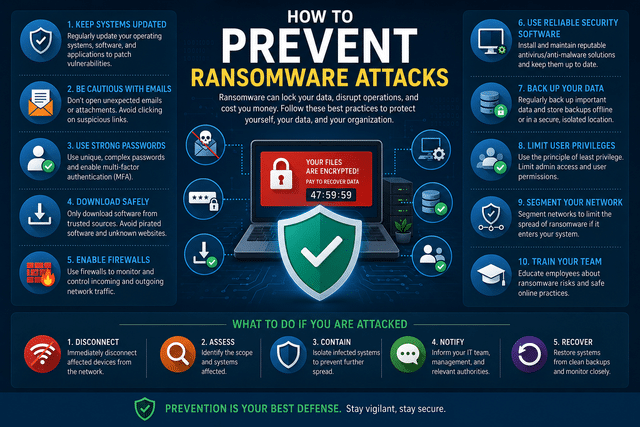
TL;DR — IN SHORT
- Ransomware encrypts your files and demands payment — often causing permanent data loss even after payment.
- Most attacks enter through phishing emails, weak passwords, or unpatched software.
- The strongest prevention combines: employee training, MFA, patching, backups, monitoring, and endpoint protection.
- No single tool stops ransomware — layered defenses do.
- If hit: isolate immediately, do not pay without consulting a professional, recover from backups.
How to prevent ransomware attacks is one of the most urgent questions facing small and mid-sized businesses today. Ransomware is no longer a threat reserved for large corporations — attackers specifically target smaller organizations because they typically have fewer defenses and are more likely to pay to recover access to their data.
This guide covers exactly what ransomware is, how it gets into business networks, and — most importantly — the specific steps that reduce your risk of becoming a victim.
What Ransomware Actually Does
Ransomware is a type of malware that encrypts files on infected devices and connected network shares, making them inaccessible. Attackers then demand payment — typically in cryptocurrency — in exchange for the decryption key.
The reality of ransomware incidents is often worse than the initial demand suggests:
- Many attackers also exfiltrate data before encrypting it, enabling double extortion — pay or we publish your data
- Paying the ransom does not guarantee files will be recovered — decryption tools provided by attackers are often unreliable
- Recovery without backups can take weeks and cost significantly more than the ransom itself
- Reputational and regulatory consequences can outlast the immediate incident
How Ransomware Gets In
Understanding entry points is the foundation of prevention. Here is where ransomware most commonly originates:
| Entry Point | How It Works | How Common |
| Phishing emails | Malicious attachments or links trick employees into executing malware | Most common — accounts for 70%+ of incidents |
| Unpatched vulnerabilities | Attackers exploit known security flaws in outdated software or OS | Very common — especially in small businesses with delayed patching |
| Compromised RDP | Weak or stolen Remote Desktop credentials allow direct network access | Common — particularly since the rise of remote work |
| Malicious downloads | Employees download infected files from websites or file-sharing services | Moderate |
| Supply chain attacks | Ransomware delivered through compromised third-party software or vendors | Increasing — high profile but less frequent for SMBs |
The Ransomware Prevention Checklist
Effective ransomware prevention is not a single product or setting — it is a combination of layered defenses that together significantly reduce the likelihood and impact of an attack.
| Prevention Layer | What It Addresses | Priority |
| Employee phishing training | Human error — the most common attack vector | Critical |
| Multi-factor authentication | Compromised credentials and unauthorized remote access | Critical |
| Software and OS patching | Exploitation of known vulnerabilities | Critical |
| 3-2-1 backup strategy | Recovery capability if encryption occurs | Critical |
| Endpoint protection (EDR) | Malware execution on devices | High |
| 24/7 network monitoring | Early detection of ransomware behavior | High |
| Least privilege access | Limits spread if a device is compromised | High |
| Secure remote access (VPN + MFA) | Eliminates exposed RDP and insecure connections | High |
Step 1 — Train employees to recognize phishing
Most ransomware attacks begin with a single employee clicking a link or opening an attachment in a convincing-looking email. Security awareness training that includes simulated phishing tests — conducted regularly, not just once a year — measurably reduces the rate at which employees fall for these attacks.
Key topics every employee should understand: how to identify suspicious sender addresses, the danger of unexpected attachments, why legitimate organizations do not request credentials by email, and what to do when something looks wrong.
Step 2 — Enable multi-factor authentication everywhere
Multi-factor authentication (MFA) requires a second form of verification beyond a password. Even if attackers obtain valid credentials through phishing or a data breach, MFA prevents them from using those credentials to log in.
Priority targets for MFA enforcement: all remote access points, email accounts, cloud services, administrative accounts, and any system that holds sensitive data.
Enabling MFA on Remote Desktop Protocol (RDP) access alone eliminates one of the most common ransomware entry points for small businesses.
Step 3 — Keep software and systems patched
Ransomware groups actively scan the internet for systems running known vulnerable software. When a patch is released, attackers immediately begin targeting businesses that have not yet applied it.
A structured patch management process — which prioritizes critical security patches and ensures they are applied within a defined window — closes these vulnerabilities before they can be exploited. For small businesses, this is most effectively handled by a managed IT provider.
Step 4 — Implement the 3-2-1 backup strategy
Backups are the most reliable recovery mechanism when ransomware successfully encrypts data. The 3-2-1 rule provides the structure:
- 3 copies of your data
- 2 stored on different media types
- 1 copy stored offsite or air-gapped (completely disconnected from the network)
The offsite or air-gapped copy is critical. Ransomware frequently targets network-connected backup systems. If backups are stored on a drive accessible from the infected network, they can be encrypted too.
Testing restores regularly matters as much as running the backups. A backup you have never tested is a backup you cannot rely on.
Step 5 — Deploy layered endpoint protection
Traditional antivirus software relies on known malware signatures — it catches what it recognizes. Modern ransomware is specifically designed to evade signature-based detection. Endpoint Detection and Response (EDR) tools take a behavioral approach: they detect suspicious activity patterns rather than looking for specific known malware.
EDR solutions can automatically quarantine suspicious processes, isolate affected devices, and alert security teams — even for ransomware variants that have never been seen before.
Step 6 — Monitor your network 24/7
Ransomware does not encrypt files the moment it enters a network. There is typically a period — sometimes days or weeks — during which the malware spreads, escalates privileges, and identifies the most valuable data to encrypt.
Network monitoring tools detect behavioral anomalies during this window: unusual lateral movement between devices, unexpected connections to external servers, sudden spikes in file system activity. Catching these signals early can stop a ransomware attack before encryption begins.
This is why 24/7 network monitoring is not just a performance tool — it is also a core component of ransomware defense.
Step 7 — Restrict access with least privilege
Every user account and service should have access only to what it actually needs to function. This principle — least privilege — limits the blast radius of a ransomware infection. If an infected device or account can only access a small portion of the network, the encryption is contained to that segment rather than spreading across everything.
Common implementations: restrict which users can access file shares, disable administrative rights on standard user accounts, segment sensitive systems onto separate network VLANs.
Step 8 — Secure remote access
Exposed Remote Desktop Protocol (RDP) ports are actively scanned and targeted by ransomware operators. Secure remote access means: disabling RDP exposure to the public internet where possible, routing all remote access through a VPN with MFA enforced, and monitoring for failed login attempts that may indicate a brute-force attack.
What to Do if Ransomware Hits Anyway
Even with strong defenses in place, no protection is absolute. Having a response plan ready before an incident occurs significantly reduces recovery time and cost.
- Isolate infected devices immediately — disconnect from the network to stop the spread
- Do not reboot infected machines — some ransomware variants activate additional payloads on restart
- Contact your IT provider right away — every minute matters for containment
- Do not pay the ransom without consulting a cybersecurity professional — payment is not guaranteed to work and may invite follow-up attacks
- Preserve evidence — forensic analysis may identify the entry point and help prevent recurrence
- Begin recovery from the most recent clean backup
How Computer Services New Jersey Helps
Ransomware prevention is not a one-time project — it is an ongoing operational discipline. Computer Services New Jersey provides managed cybersecurity services specifically designed for small and mid-sized businesses in New Jersey, including:
- 24/7 network monitoring with real-time threat alerting
- Managed endpoint protection with EDR capabilities
- Patch management to ensure systems are always up to date
- Managed backup solutions with offsite and cloud storage
- Employee phishing training and security awareness programs
- Incident response support if an attack occurs
Visit our cybersecurity services page to learn more, or contact us for a free security assessment.
Conclusion
How to prevent ransomware attacks is not a question with a single answer — it is a commitment to layered defense. Employee training closes the human gap. MFA blocks compromised credentials. Patching eliminates known vulnerabilities. Backups ensure recovery. Monitoring detects threats in progress.
Ransomware succeeds when defenses are incomplete. The good news is that most attacks are not sophisticated — they exploit gaps that are preventable. Building those defenses systematically is the most reliable way to ensure your business is not the next target.
FAQ — FREQUENTLY ASKED QUESTIONS
The questions below are recommended for FAQ structured data (JSON-LD) implementation on the published page.
| What is the most effective way to prevent ransomware? | No single measure is sufficient. The most effective approach combines employee training, multi-factor authentication, regular patching, endpoint protection, network monitoring, and tested data backups. Removing any one of these creates a gap attackers can exploit. |
| Can antivirus software stop ransomware? | Antivirus software helps, but is not enough on its own. Modern ransomware variants are designed to evade signature-based detection. Layered protection — including behavioral monitoring, network-level filtering, and endpoint detection — provides stronger defense. |
| How does ransomware enter a business network? | The most common entry points are phishing emails with malicious attachments or links, exploitation of unpatched software vulnerabilities, compromised Remote Desktop Protocol (RDP) credentials, and malicious downloads. Phishing accounts for the majority of ransomware incidents. |
| What should a business do immediately after a ransomware attack? | Isolate infected devices from the network immediately to stop the spread. Do not pay the ransom before consulting a cybersecurity professional — payment does not guarantee file recovery. Contact your IT provider, preserve evidence, and begin recovery from clean backups if available. |
| How often should businesses back up data to protect against ransomware? | Critical data should be backed up at least daily, with backups stored in at least two separate locations — including one that is offline or air-gapped. The 3-2-1 backup rule (3 copies, 2 different media, 1 offsite) is the standard recommendation. |
| Is multi-factor authentication effective against ransomware? | Yes, significantly so. MFA prevents attackers from using stolen credentials to access systems remotely — one of the most common ransomware delivery methods. Enabling MFA on all remote access points and critical systems is one of the highest-impact steps a business can take. |
Author
-
At Computer Services New Jersey, led by George Ancuta, we believe that small and midsize businesses deserve the same level of security, reliability, and strategic foresight as global financial institutions. Our firm provides more than just support; we offer a quarter-century of technical perspective forged in the world’s most demanding financial and corporate environments.