IT support for law firms NJ practices can rely on becomes critical when an attorney suddenly cannot access a matter file, legal application, email account, or filing system before a court deadline. Law firms need technology that keeps essential systems accessible while protecting privileged client information and supporting deadlines that cannot simply be postponed when technology fails.
Why General IT Support Isn’t Enough for a Law Firm

A law firm’s technology environment has requirements that ordinary business IT support may not fully address. Client files can contain privileged or confidential information, making controlled access particularly important. Attorneys also work around court and filing deadlines imposed outside the firm, so a technology failure can interfere directly with time-sensitive legal work.
Legal practices also depend on specialized systems for practice management, document management, billing, trust accounting, and electronic filing. Access may need to be controlled at the matter level rather than simply giving every employee access to shared company files.
Effective IT support for New Jersey businesses therefore needs to account for how a legal practice actually handles its applications, documents, users, and deadlines.
Help Desk That Understands a Filing Deadline
Imagine a critical legal application stops working at 4:00 PM the day before a filing deadline. An attorney may suddenly lose access to a matter file, filing-related system, time-sensitive email, or document needed to complete the work.
In a legal environment, the impact of the incident matters when determining priority. A problem that prevents an attorney from accessing the systems or information required for a time-sensitive filing should be identified as a deadline-critical issue and prioritized according to its effect on the firm’s legal work. Remote IT support services can help troubleshoot and resolve technical problems without requiring attorneys or staff to determine the source of the issue themselves.
The Legal Software Your Firm Already Runs

Law firms rarely depend on a single application. Their technology environments may combine practice management, document management, billing and accounting platforms, electronic filing systems, and the infrastructure required to keep those tools accessible.
Practice Management
Law firms may use platforms such as Clio, MyCase, PracticePanther, Smokeball, Rocket Matter, and Actionstep, while CSNJ supports legal offices running LEAP. IT support must also account for the workstations, networks, user accounts, and cloud services through which attorneys and staff access these platforms.
Document Management
Platforms such as iManage and NetDocuments help law firms organize and control access to matter-related documents. IT support can help maintain reliable access while appropriate permissions determine which users can reach sensitive information.
Time, Billing & Trust Accounting
Platforms such as Tabs3, Timeslips, and PCLaw support timekeeping, billing, accounting, and other administrative workflows. Access problems can therefore interfere with essential firm operations.
E-Filing
Attorneys may depend on New Jersey eCourts, with JEDS available for case types and documents not covered by eCourts, as well as federal systems including PACER and CM/ECF. Reliable network, browser, authentication, and document access becomes especially important near filing deadlines.
Vendor Coordination
Legal-software problems may originate in an application, workstation, network, server, cloud environment, or account. An IT provider can help isolate the issue and coordinate with the appropriate software vendor when necessary.
Protecting Privileged Client Information

A law firm’s cybersecurity strategy must reflect the sensitivity of client information. Verizon’s 2026 Data Breach Investigations Report found that the human element was involved in 62% of breaches, reinforcing the need to control not only access to the firm’s systems, but also which users can reach particular client files and matters.
Matter-Level Access and Ethical Walls
Access controls can restrict sensitive client information to the people authorized to work on a particular matter. Information barriers, often called ethical walls, can further prevent personnel with legitimate access to the firm’s broader systems from accessing restricted matters or client information.
MFA and Role-Based Access
Partners, associates, paralegals, contract attorneys, and administrative employees may require different levels of access. Role-based permissions can align access with responsibilities, while MFA adds another authentication layer for protected accounts. These controls form part of broader law firm cybersecurity measures.
Cyber Insurance
Cyber-insurance requirements vary by carrier and policy, and some policies may require controls such as MFA or other cybersecurity protections. Law firms should review their own policy requirements rather than assuming the same controls apply universally.
Wire Fraud and Phishing at Closing
Consider a real-estate transaction approaching closing. Someone at the firm receives an apparently legitimate email stating that wire instructions have changed and providing a different account. The message may seem credible because it relates to a real transaction and creates pressure to act quickly.
According to the FBI’s 2025 Internet Crime Report, business email compromise resulted in approximately $3.05 billion in reported losses across 24,768 complaints.
Changed wire instructions should be independently verified through a trusted contact method, such as calling a previously verified phone number rather than one supplied in the message. Out-of-band verification, email security, filtering, and awareness of phishing email warning signs can provide additional protection.
Confidentiality Obligations and What They Mean for Your IT
A law firm’s professional responsibilities can influence how it protects and manages client information. New Jersey RPC 1.6 addresses confidentiality, while ABA Formal Opinions 477R and 483 address secure communications and lawyers’ responsibilities following certain data breaches or cyberattacks. New Jersey’s breach-notification requirements are addressed in N.J.S.A. 56:8-163.
These considerations can affect secure communications, authentication, access controls, client-file protection, and incident response. Firms handling medical information may also need to consider whether HIPAA or other privacy requirements apply.
Technology systems may also need to support litigation holds, retention policies, and eDiscovery by preserving relevant emails, documents, and case data.
This information is provided for general informational purposes and is not legal advice. Each firm should evaluate its own professional, regulatory, and legal obligations.
Can Your Technicians See Our Client Files?
Outsourced IT management may require administrative access to systems containing confidential client information, making access governance an important consideration. Technical access should be limited to what is necessary for administration or troubleshooting, with safeguards such as least-privilege permissions, restricted administrative access, access logging, and confidentiality procedures. Firms may also want to ask prospective providers about technician background checks and when personnel might access systems containing client material.
Microsoft 365, Secure Email, and Document Access

Attorneys may need access to email, documents, and collaboration tools from the office, home, court, or other locations. Microsoft 365 supports this through Outlook for business email, SharePoint and OneDrive for document access, and Teams for collaboration.
MFA, appropriate permissions, and device and account controls can help protect firm information while maintaining access. Permissions should also be updated when attorneys or staff join, change roles, or leave the firm. Properly managed cloud email services can help balance accessibility with protection for business communications and documents.
Secure Remote Access and Business Continuity

Attorneys working outside the office may need secure access to documents, email, and legal applications. VPNs or other appropriately secured remote-access methods, combined with MFA and endpoint protection, can help maintain controlled access from different locations and devices.
Remote access should also support business continuity. Network outages, hardware failures, ransomware, an inaccessible office, or disruptions to cloud services can prevent attorneys from reaching critical systems. Secure remote IT support and continuity planning can help maintain or restore access when normal operations are disrupted.
Recovering Before the Next Filing
The practical backup question for a law firm is whether attorneys can recover the documents, applications, servers, or cloud data they need before the next filing or client deadline. Recovery planning should identify critical systems, test whether backups can be restored, and determine how much disruption the practice can tolerate.
Two useful measurements are RPO and RTO. Recovery Point Objective (RPO) defines how much recent data the firm can afford to lose, while Recovery Time Objective (RTO) defines how quickly a critical system needs to be restored. These priorities can inform broader managed IT services and business continuity planning.
Proactive Monitoring and Maintenance for Law Firm Systems

For a law firm, an infrastructure problem can become a legal-work problem when attorneys cannot access systems required for an active matter or approaching deadline. Proactive monitoring can track servers, networks, workstations, backups, and security alerts so potential issues can be identified earlier.
Patching and planned maintenance should also account for the firm’s court calendar, filing deadlines, and other time-sensitive work whenever possible. CSNJ provides 24/7 proactive monitoring, with technical staff on call 24/7/365, while proactive network monitoring can help maintain visibility across the firm’s technology environment.
What Does Managed IT Support Cost for a New Jersey Law Firm?

Managed IT costs vary based on factors such as the number of attorneys, staff, and devices; office locations; on-premises, cloud, or hybrid infrastructure; legal applications; cybersecurity; backup and recovery; after-hours support; and planned projects or migrations. For a law firm, cost is also shaped by the practice management and document management systems that need supporting, and by retention and matter-level access requirements a general business environment does not have.
CSNJ offers different support models, including flat-rate managed IT agreements with unlimited monthly IT support, as well as hourly per-call support and blocks of support hours. The appropriate model depends on the firm’s technology environment and support requirements.
Switching IT Providers Without Disrupting Your Practice

Switching IT providers should begin with documenting the systems and information the incoming provider will need, including hardware, networks, Microsoft 365 and cloud environments, administrative credentials, backups, cybersecurity tools, software licenses, legal applications, vendor contacts, and unresolved issues.
For law firms, the transition should also account for eCourts and other filing-related access, including the accounts and credentials attorneys rely on near filing deadlines. Where appropriate, the outgoing provider can coordinate the secure transfer of credentials, licenses, and documentation to the incoming provider.
Good documentation can also simplify future onboarding, new devices or applications, and office expansion. IT project services can support technology transitions and other planned infrastructure work.
Why New Jersey Law Firms Choose Computer Services New Jersey

Computer Services New Jersey is based in Holmdel, New Jersey, and its leadership describes more than 25 years of technology experience. The company specifically identifies law firms among the professional-services organizations it supports.
CSNJ provides 24/7 proactive monitoring and support and works with on-premises, cloud, and hybrid environments. The company also states that it answers support requests in 30 minutes or less, which matters most when an issue arises close to a filing deadline. Law firms can learn more about Computer Services New Jersey and its approach to supporting New Jersey organizations.
Get an IT Assessment for Your Law Firm
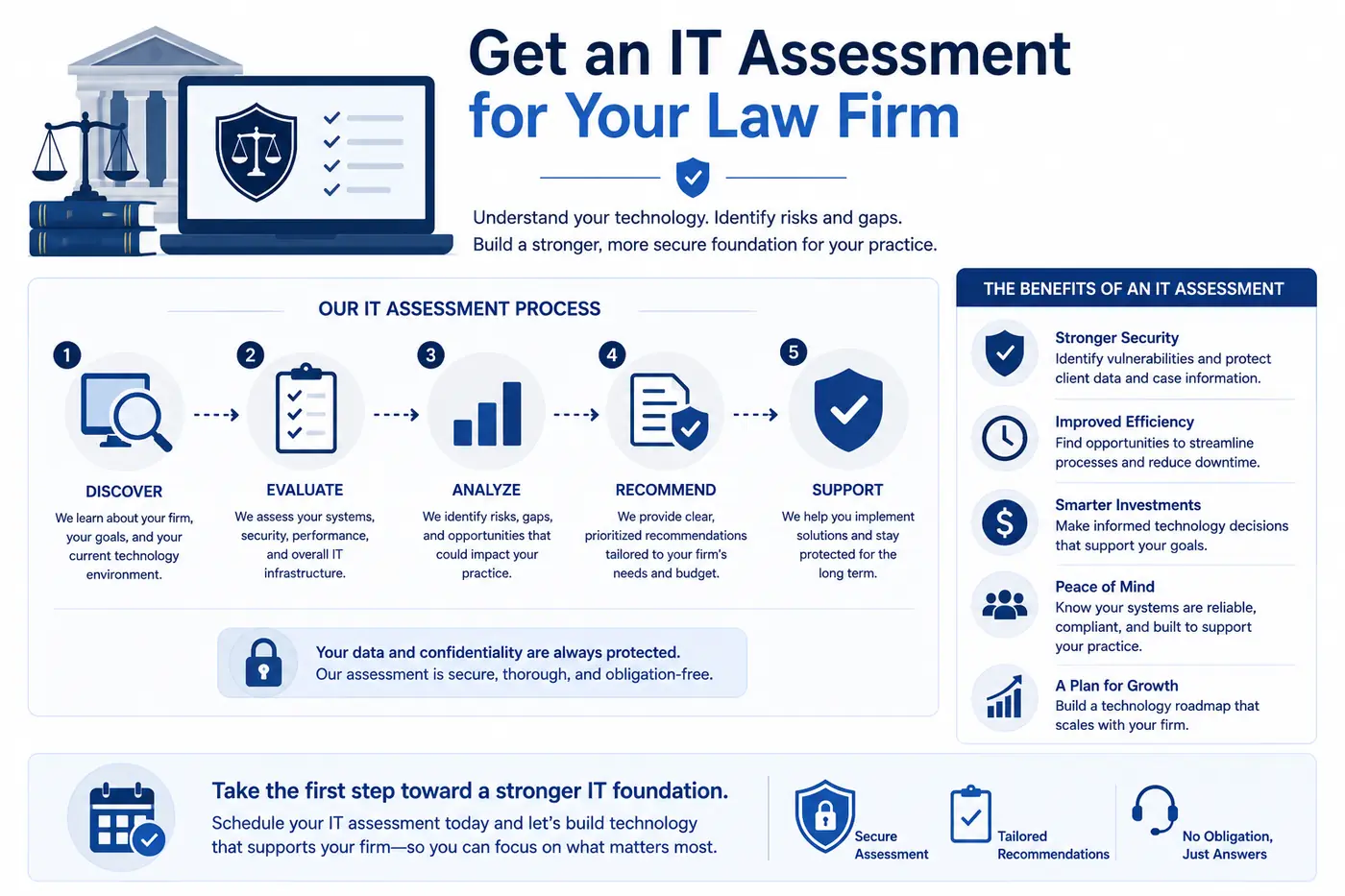
An IT assessment can help your firm identify technology risks, support requirements, and priorities across infrastructure, legal software, cybersecurity, remote access, backup and recovery, and recurring technical issues.
The review looks at how your legal applications are configured, who can reach which matters, how remote access is secured, and whether your backups would restore in time for the next filing.
For a clearer picture of your technology environment and next steps, schedule an IT assessment with Computer Services New Jersey.
Frequently Asked Questions About IT Support for Law Firms
Do you support the legal software our firm already uses?
Law firms may rely on practice management, document management, billing, trust accounting, and e-filing platforms alongside their broader IT environment. CSNJ supports legal offices running LEAP, while compatibility and support requirements for other legal applications can be reviewed during the IT assessment.
Can your IT technicians access confidential client files?
Technical access should be limited to what is necessary to manage and troubleshoot the firm’s systems. Appropriate controls can include least-privilege permissions, restricted administrative access, confidentiality procedures, and access logging.
What happens if our systems go down before a court filing deadline?
Deadline-critical IT incidents should be prioritized based on their impact on the firm’s legal work. Tested backups, recovery planning, system monitoring, and an established escalation process can help restore access to essential documents, applications, email, and other systems needed for time-sensitive filings.
Do you work with solo practitioners and small firms, or only larger practices?
Support requirements vary between solo practices, small law firms, and larger environments. CSNJ can assess the firm’s users, devices, legal applications, cybersecurity requirements, and infrastructure to recommend an appropriate support approach.
How much does managed IT support for a New Jersey law firm cost?
Costs vary based on the firm’s users, devices, infrastructure, cybersecurity, backup needs, legal applications, and desired support coverage. An IT assessment can help determine the appropriate service model.
How difficult is it to switch IT providers?
A structured transition can minimize disruption by documenting infrastructure, credentials, licenses, backups, cybersecurity tools, vendors, and unresolved issues. Coordination with the outgoing provider can help transfer critical systems and information in an organized manner.
Need serious people to handle your biz? Work with us!
Author
-
At Computer Services New Jersey, led by George Ancuta, we believe that small and midsize businesses deserve the same level of security, reliability, and strategic foresight as global financial institutions. Our firm provides more than just support; we offer a quarter-century of technical perspective forged in the world’s most demanding financial and corporate environments.