In Short
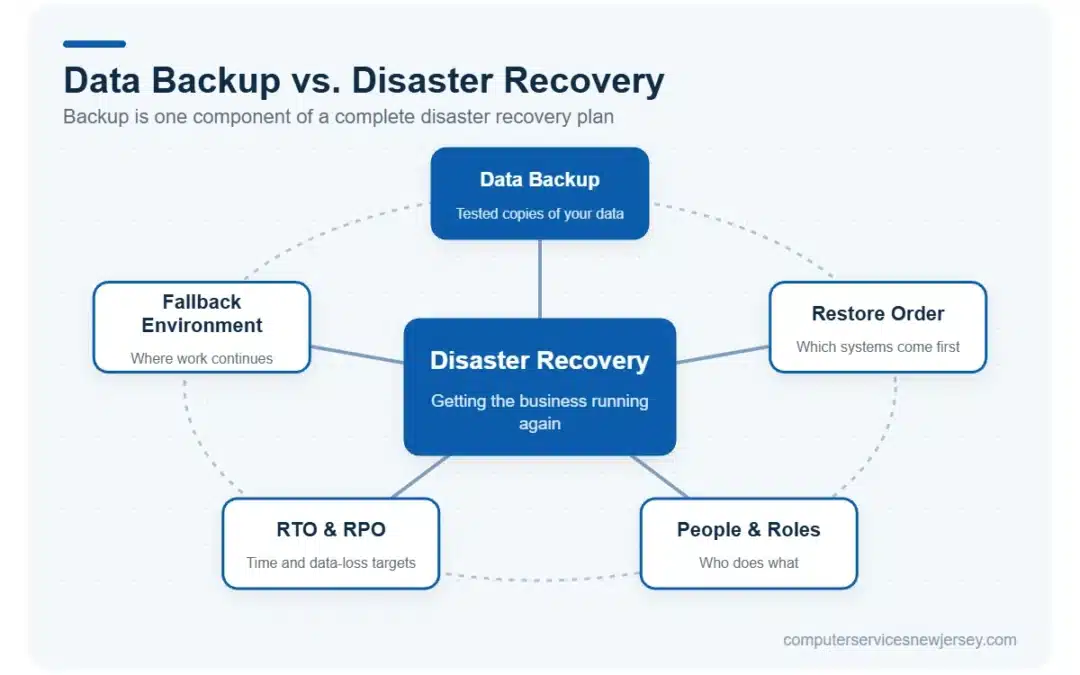
- Backup is a copy of your data. Disaster recovery (DR) is the full plan for getting your business operational again after something goes wrong.
- A backup answers “can we get the data back?” Disaster recovery answers “how fast can we get everything running again?”
- Having backups is not the same as being able to recover — many businesses discover this only after a failure.
- Two metrics define a real DR plan: RTO (how long you can afford to be down) and RPO (how much data you can afford to lose).
- NJ businesses need both: backup as the foundation, disaster recovery as the strategy built on top of it.
Table of Contents
Why these two terms get confused
“Backup” and “disaster recovery” are often used as if they mean the same thing. They don’t — and the confusion is costly. Plenty of businesses believe they’re protected because they have backups running, only to discover during an actual crisis that having the data and being able to use it again are two very different things.
Understanding the distinction is what separates a business that recovers in hours from one that scrambles for days.
What data backup actually is
A backup is simply a copy of your data, stored somewhere separate from the original. If a file is deleted, a drive fails, or ransomware encrypts your systems, the backup lets you restore that data.
Backups can live on local drives, network-attached storage, the cloud, or ideally a combination — which is where cloud backup services fit in. The strength of a backup depends on how often it runs, how many versions it keeps, whether it’s stored offsite, and — most importantly — whether it has actually been tested to restore correctly. The same logic applies to SaaS data: tools like Microsoft 365 Backup protect mailboxes and files, but they still need a recovery plan around them.
But a backup, on its own, is just data sitting in storage. It doesn’t tell you how to rebuild your operations, in what order, or how quickly. That’s where disaster recovery comes in.
What disaster recovery actually is
Disaster recovery is the complete plan and process for restoring your business operations after a disruptive event. Backup is one component of it — but DR also covers the systems, sequence, roles, and timing involved in getting everything back online.
A real disaster recovery plan answers questions like: Which systems come back first? Who does what during the incident? Where do we run operations if the primary environment is unavailable? How long will full recovery take? It turns “we have the data somewhere” into “here’s exactly how we get back to work.”
Backup vs. disaster recovery: side-by-side
| Aspect | Data Backup | Disaster Recovery |
|---|---|---|
| What it is | A copy of your data | A plan to restore operations |
| Question it answers | “Can we get the data back?” | “How fast can we run again?” |
| Scope | Files, databases, systems | People, processes, systems, timing |
| Focus | Data preservation | Business continuity |
| On its own | Passive storage | Actionable strategy |
| Includes the other? | No | Yes — backup is part of DR |
| Key metric | Frequency / retention | RTO and RPO |
RTO and RPO: the two numbers that define recovery
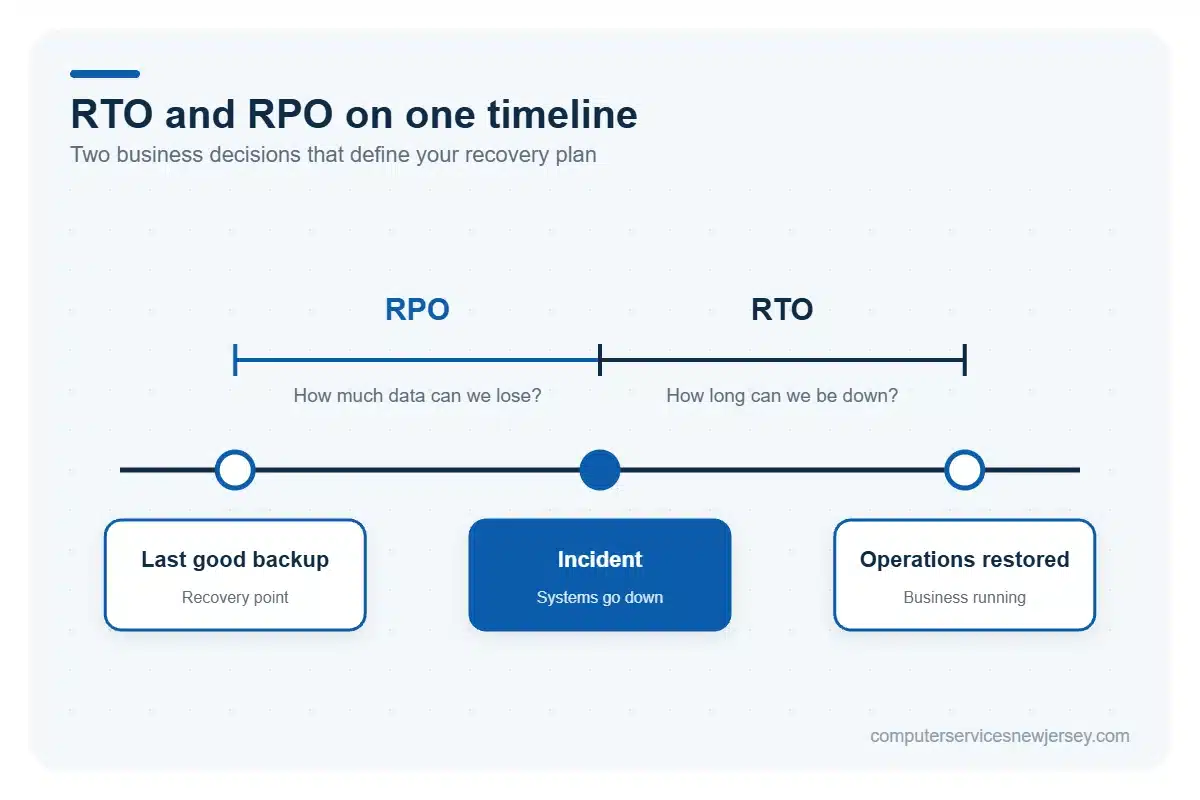
Every serious disaster recovery plan is built around two metrics. They sound technical, but they’re really business decisions.
| Metric | Full name | What it answers | Business meaning |
|---|---|---|---|
| RTO | Recovery Time Objective | How long can we be down? | Maximum acceptable downtime before real damage |
| RPO | Recovery Point Objective | How much data can we lose? | How far back a recovery can go (last backup) |
A short RTO means you need systems that can be restored fast — which usually requires more robust infrastructure. A short RPO means you need backups running frequently, so you never lose more than a small window of work. Defining these two numbers honestly is the starting point of any recovery plan, because they determine what your backup and DR setup actually needs to deliver.
Why backups alone will let you down
Here’s the scenario that catches businesses off guard: the backups were running, the data was there — but recovery still took days.
Why? Because nobody had defined the order of restoration. Because the backup had never been tested and turned out to be corrupted. Because the only person who understood the setup was unreachable. Because there was no plan for where to run operations while the main environment was rebuilt.
Backups protect your data. They do not, by themselves, protect your ability to keep operating. That gap — between having data and being functional — is exactly what disaster recovery is designed to close. And because ransomware increasingly targets backups too, recovery planning works best alongside proper cybersecurity services.
What a complete strategy looks like
A complete approach layers the two together. Reliable, frequently-run, offsite, tested backups form the foundation. On top of that sits a documented disaster recovery plan: defined RTO and RPO, a clear restoration sequence, assigned responsibilities, and a fallback environment so work can continue while systems are rebuilt.
For most New Jersey businesses, the practical starting point is an honest assessment: How current are our backups? Have they ever been tested? Do we actually have a recovery plan, or just the assumption of one? The answers usually reveal exactly where the gaps are — and they’re almost always cheaper to fix before an incident than after. Computer Services New Jersey can help you review both.
Frequently Asked Questions (FAQ)
If I have backups, do I still need disaster recovery?
Yes. Backups only preserve copies of your data. Disaster recovery is the plan that tells you how to actually restore operations — in what order, how fast, and with whom. Without it, you may have your data but still be unable to get your business running quickly after a failure.
What’s the difference between RTO and RPO?
RTO (Recovery Time Objective) is how long your business can afford to be down before it causes serious harm. RPO (Recovery Point Objective) is how much data you can afford to lose, measured back to your last good backup. RTO is about downtime; RPO is about data loss.
How often should backups run?
It depends on your RPO. If losing a full day of data would be damaging, backups should run several times a day or continuously. If losing a day is tolerable, daily backups may be enough. The right frequency is whatever keeps potential data loss within your acceptable RPO window.
Need serious people to handle your biz? Work with us!
Author
-
At Computer Services New Jersey, led by George Ancuta, we believe that small and midsize businesses deserve the same level of security, reliability, and strategic foresight as global financial institutions. Our firm provides more than just support; we offer a quarter-century of technical perspective forged in the world’s most demanding financial and corporate environments.