In Short
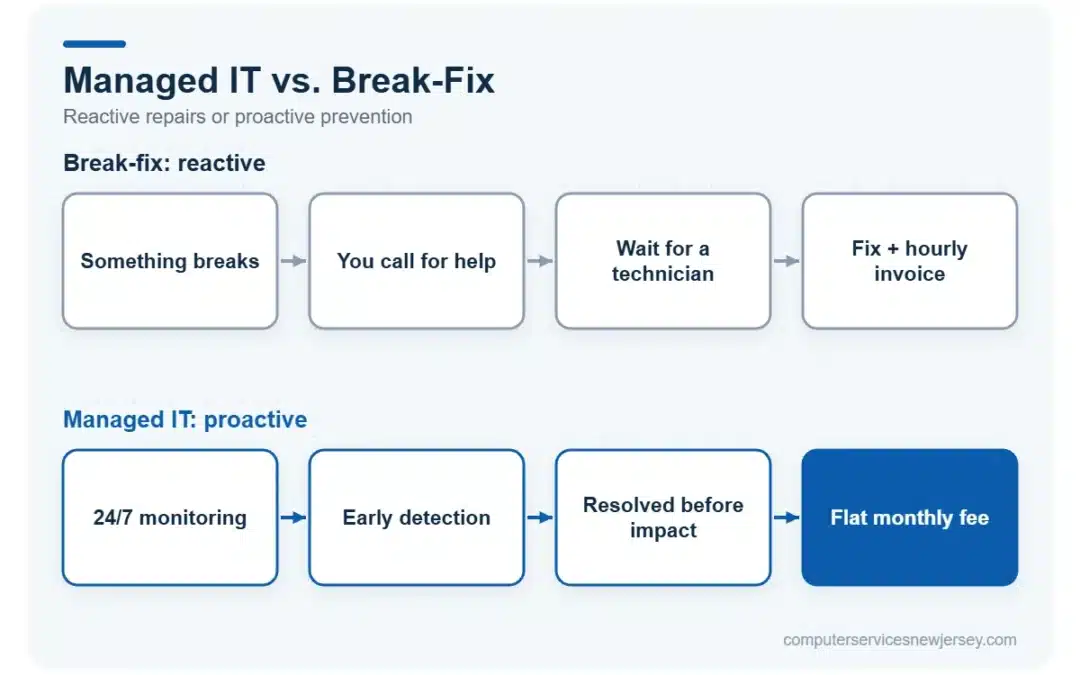
- Break-fix means you call for help only when something breaks, and pay per incident. Managed IT means a provider monitors and maintains your systems continuously for a flat monthly fee.
- Break-fix looks cheaper on paper but costs more over time through downtime, emergency rates, and unpredictable bills.
- Managed IT shifts the focus from fixing problems to preventing them — patching, monitoring, backups, and security run in the background.
- For most small and mid-sized NJ businesses with 5+ employees or any compliance requirements, managed IT is the more cost-effective and lower-risk choice.
- Break-fix can still make sense for very small operations with minimal IT dependence and no downtime-sensitive workflows.
Table of Contents
- What “break-fix” IT support actually means
- What “managed IT services” actually means
- Managed IT vs. break-fix: side-by-side comparison
- The hidden cost of downtime
- Security: the biggest difference between the two models
- When break-fix still makes sense
- How to know which model your business needs
- Frequently Asked Questions (FAQ)
What “break-fix” IT support actually means
Break-fix is the traditional, reactive model. Your systems run until something goes wrong — a server crashes, email stops syncing, a computer won’t boot — and then you call an IT company to come fix it. You’re billed by the hour or by the incident.
There’s no ongoing relationship in the technical sense. The provider doesn’t watch your network, doesn’t apply updates on a schedule, and doesn’t know your setup until they’re standing in front of the problem. Once it’s fixed, they leave, and the meter stops.
For years this was the default for small businesses. It felt logical: why pay for IT when nothing is broken? But that logic quietly ignores what happens between the calls — the vulnerabilities that go unpatched, the backups nobody is checking, and the small warning signs that turn into big failures.
What “managed IT services” actually means
Managed IT flips the model from reactive to proactive. Instead of waiting for things to break, a managed services provider (MSP) continuously monitors and maintains your systems for a predictable monthly fee.
That typically includes around-the-clock network monitoring of servers, networks, and endpoints; automatic security patching; managed antivirus and spam filtering; cloud backup; and help desk support with a defined response time. The goal is that most problems are caught and resolved before they ever interrupt your work.
Crucially, the MSP knows your environment. Because they’re maintaining it every day, they understand your infrastructure, your recurring issues, and your priorities — which means faster, better-informed help when you do need it. That is the core of managed IT services.
Managed IT vs. break-fix: side-by-side comparison
| Factor | Break-Fix | Managed IT Services |
|---|---|---|
| Cost structure | Per hour / per incident | Flat monthly fee |
| Billing predictability | Unpredictable, spikes during emergencies | Predictable, budgetable |
| Approach | Reactive (fix after failure) | Proactive (prevent failure) |
| Monitoring | None | 24/7 continuous |
| Security patching | Ad hoc, often skipped | Scheduled and managed |
| Backups | Rarely verified | Managed and tested |
| Response time | “When we can get to you” | Defined SLA (e.g. 30 min) |
| Provider knows your setup | No — starts fresh each time | Yes — maintains it daily |
| Incentive alignment | Paid more when things break | Paid to keep things working |
| Best for | Very small, low-dependence setups | Growing / downtime-sensitive businesses |
The hidden cost of downtime
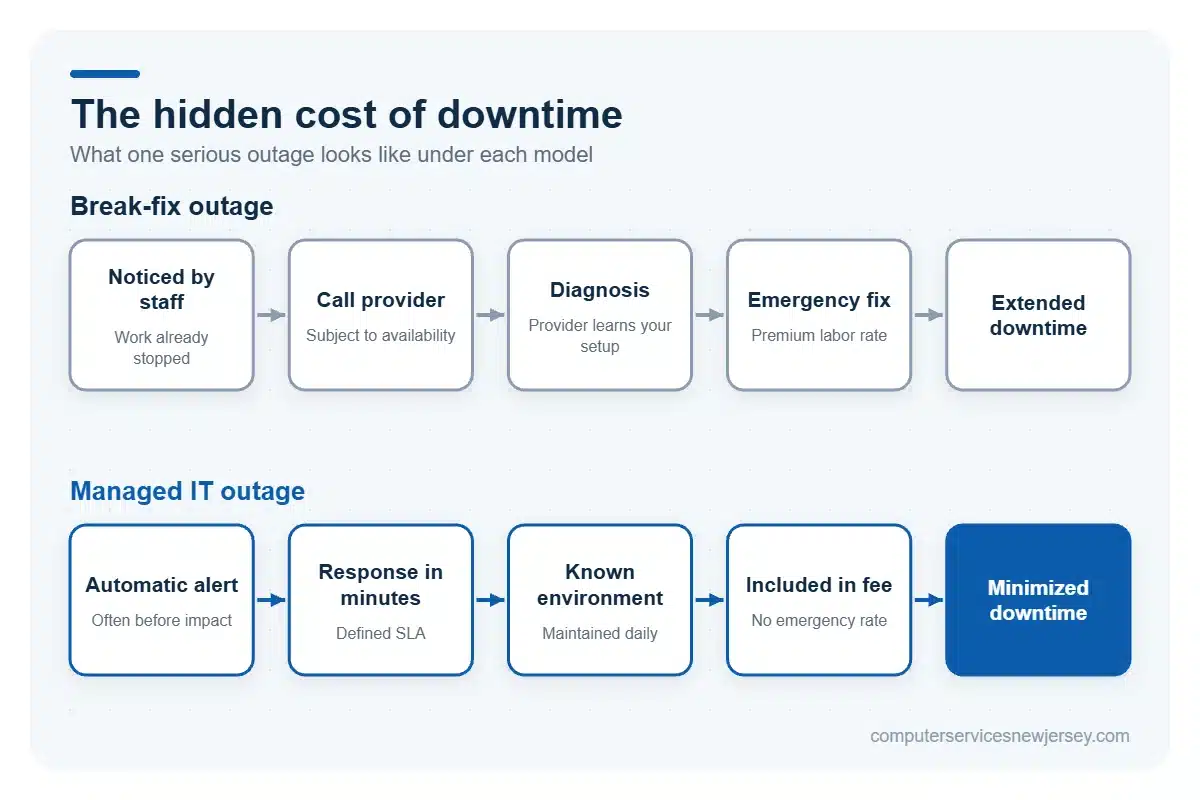
The break-fix price tag is deceptive because it only counts the invoice — not the downtime around it.
When a critical system fails under break-fix, the clock starts running the moment you notice. You call the provider, wait for availability, wait for diagnosis, then wait for the fix. During all of that, your team may be unable to work, your clients may be unable to reach you, and revenue-generating activity may simply stop.
Consider a rough comparison of what a single serious outage can look like under each model:
| Scenario | Break-Fix | Managed IT |
|---|---|---|
| Issue detected | When a person notices | Automatically, often before impact |
| Time to first response | Hours (subject to availability) | Minutes (defined SLA) |
| Emergency labor rate | Premium / after-hours | Included in monthly fee |
| Typical downtime | Extended | Minimized or avoided |
| Data loss risk | Higher (backups unverified) | Lower (backups managed) |
Even one avoided outage per year can offset a significant portion of a managed IT contract. Multiply that across the smaller issues that never become emergencies because they were caught early, and the math usually favors the proactive model.
Security: the biggest difference between the two models
This is where the gap becomes hardest to ignore.
Modern cyber threats — ransomware, phishing, credential theft — don’t wait for a convenient time. They exploit exactly the things break-fix tends to neglect: unpatched software, weak monitoring, and unverified backups. Under a reactive model, a security flaw can sit exposed for months because nobody is responsible for finding it.
Managed IT builds security into the baseline. Patches are applied on schedule, monitoring flags suspicious activity as it happens, and backups are maintained so that even a successful attack doesn’t mean permanent data loss. For any business handling client data or operating under compliance requirements, that ongoing coverage — backed by proper cybersecurity services — isn’t a luxury; it’s the minimum standard of care.
When break-fix still makes sense
Managed IT isn’t automatically the answer for everyone. Break-fix can still be reasonable if:
- Your business is very small (one or two people) with minimal reliance on technology.
- You have no compliance or data-security obligations.
- Occasional downtime genuinely doesn’t hurt your revenue or reputation.
- Your systems are simple and rarely change.
The moment any of those stops being true — you add staff, take on sensitive data, or start losing money when systems are down — the reactive model starts working against you.
How to know which model your business needs
A simple test: ask what happens to your business if a core system goes down for a full day. If the honest answer is “not much,” break-fix may be enough. If the answer involves lost revenue, missed deadlines, frustrated clients, or exposed data, you’ve outgrown the reactive model.
Most growing New Jersey businesses land in the second category sooner than they expect. The shift to managed IT isn’t really about spending more on technology — it’s about trading unpredictable risk for predictable protection. If you’re not sure which side of that line you’re on, talk to Computer Services New Jersey about an assessment of your current setup.
Frequently Asked Questions (FAQ)
Is managed IT more expensive than break-fix?
Per month, managed IT has a fixed cost while break-fix has none — so break-fix can look cheaper during quiet periods. But once you factor in emergency rates, downtime, and unpatched security risks, managed IT is usually more cost-effective over a full year, especially for businesses that depend on their systems daily.
Can a business switch from break-fix to managed IT easily?
Yes. A good provider starts with an assessment of your current environment, documents what you have, addresses any urgent gaps, and then brings your systems under continuous monitoring and maintenance. The transition is typically smooth and doesn’t require replacing everything you own.
Does managed IT mean I lose control over my own systems?
No. Managed IT is a partnership — the provider maintains and protects your systems, but you retain ownership and decision-making. You get better visibility into your IT, not less, because someone is actively tracking and reporting on it.
Need serious people to handle your biz? Work with us!
Author
-
At Computer Services New Jersey, led by George Ancuta, we believe that small and midsize businesses deserve the same level of security, reliability, and strategic foresight as global financial institutions. Our firm provides more than just support; we offer a quarter-century of technical perspective forged in the world’s most demanding financial and corporate environments.