TABLE OF CONTENTS
- What multi-factor authentication actually means
- The three types of authentication factors
- Common MFA methods, compared
- Why passwords alone are no longer enough
- How MFA stops the most common attacks
- Rolling out MFA without disrupting your team
- Frequently Asked Questions
TL;DR — IN SHORT
- MFA requires two or more independent proofs of identity before granting access, instead of a password alone.
- The three factor types are something you know, something you have, and something you are.
- App-based push approval and authenticator apps are generally considered stronger than SMS codes.
- MFA blocks the large majority of account takeover attempts, even when a password has already been stolen or guessed.
- A phased rollout, starting with high-risk accounts, keeps disruption low while closing the biggest security gaps first.
Multi-factor authentication has gone from an optional security add-on to something closer to a baseline expectation, and for good reason. A stolen or guessed password used to be enough for an attacker to walk straight into an account. With MFA in place, that same stolen password becomes far less useful on its own.
This guide covers what MFA actually is, the different methods available, and why it consistently ranks as one of the highest-impact, lowest-cost security controls a business can implement.
What multi-factor authentication actually means
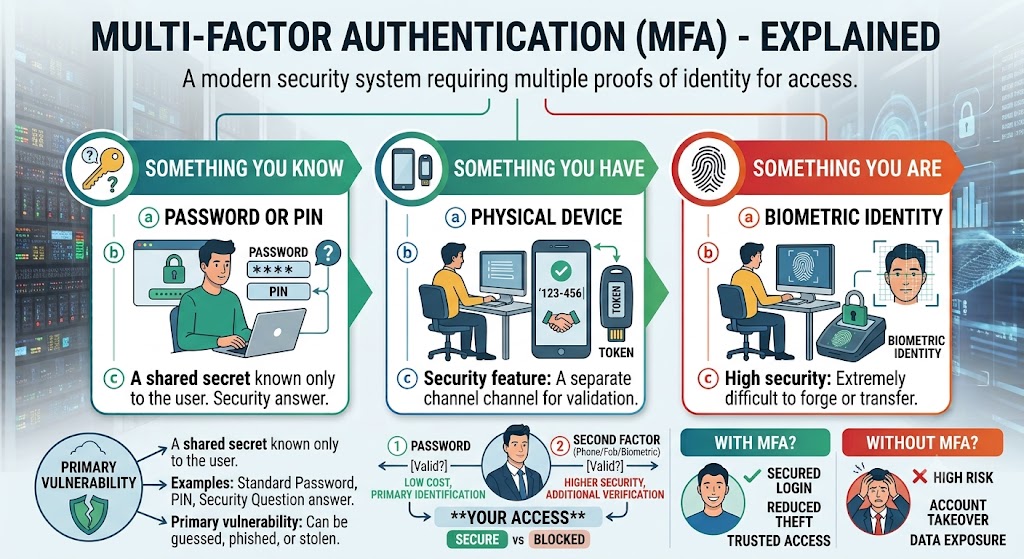
Multi-factor authentication (MFA) is a security process that requires two or more separate, independent forms of verification before granting access to an account or system. Instead of relying on a single credential — typically a password — MFA layers additional proof of identity on top of it.
The logic behind MFA is straightforward: even if one factor is compromised (a password gets stolen, guessed, or phished), an attacker still needs to bypass the second factor to gain access, which is significantly harder to do remotely.
The three types of authentication factors
- Something you know — a password, PIN, or security question answer.
- Something you have — a phone, hardware security key, or authenticator app that generates a time-limited code.
- Something you are — a biometric identifier, such as a fingerprint or facial recognition scan.
True MFA combines factors from at least two of these categories. Requiring a password plus a security question, for example, doesn’t count as MFA, since both are “something you know.”
Common MFA methods, compared
| MFA Method | Strengths and Trade-offs |
| SMS text code | Easy to set up and familiar to users, but vulnerable to SIM-swapping attacks and interception. |
| Authenticator app (TOTP) | Generates time-based codes offline; stronger than SMS since it doesn’t rely on the phone network. |
| Push notification approval | Fast and user-friendly — a single tap to approve; widely considered a strong balance of security and convenience. |
| Hardware security key | Among the strongest options available, resistant to phishing, but requires a physical device to be carried. |
| Biometric verification | Convenient and hard to replicate remotely, but typically requires compatible hardware (fingerprint reader, camera). |
📌 Note: SMS-based MFA is still far better than no MFA at all, but it’s the weakest option among current methods. Where possible, an authenticator app or hardware key provides meaningfully stronger protection against SIM-swapping and interception attacks.
Why passwords alone are no longer enough
Passwords fail for reasons that have very little to do with how “strong” they are. Data breaches at unrelated companies routinely expose billions of username-and-password combinations, and because many people reuse passwords across accounts, a breach on one site can unlock accounts on completely unrelated platforms.
Phishing emails are specifically designed to trick employees into typing their password into a fake login page, handing the credential directly to an attacker regardless of how complex the password was. In each of these scenarios, MFA is what stops a stolen password from turning into an actual account takeover.
How MFA stops the most common attacks
- Credential stuffing — attackers testing stolen username/password pairs from other breaches are blocked at the second factor, even with a valid password in hand.
- Phishing — even if an employee enters credentials on a fake login page, the attacker still lacks the second factor needed to complete the login (though advanced phishing kits can attempt to relay MFA prompts in real time, which is why phishing-resistant methods like hardware keys are gaining traction).
- Brute-force attacks — automated password-guessing tools become largely ineffective once a second factor is required.
- Remote access abuse — MFA on VPNs and remote desktop access significantly reduces the risk of an exposed or weak password providing a direct path into your network.
Rolling out MFA without disrupting your team
A common concern is that MFA will slow employees down or generate a wave of support tickets. In practice, a phased approach minimizes disruption while closing the biggest risks first.
- Start with the highest-risk accounts — email, admin accounts, and remote access tools — before expanding company-wide.
- Choose app-based push approval over SMS where possible, since it adds only a few seconds to login.
- Provide a short training session or written guide so employees understand why the change is happening, not just how to click approve.
- Set up backup authentication methods in advance, so a lost or replaced phone doesn’t lock someone out of their account.
Conclusion
Multi-factor authentication remains one of the most effective, lowest-cost security controls a business can put in place, closing the gap that a stolen or guessed password alone used to leave wide open. The specific method matters — push approval and hardware keys offer meaningfully stronger protection than SMS — but any form of MFA is a significant improvement over passwords alone.
If your business hasn’t rolled out MFA across email, remote access, and admin accounts yet, our cybersecurity team can help you plan a rollout that closes the biggest gaps first, without disrupting your team’s daily workflow. You can also get in touch here to schedule an assessment.
FREQUENTLY ASKED QUESTIONS
| Question | Answer |
| What is multi-factor authentication? | Multi-factor authentication (MFA) is a security process that requires two or more separate forms of verification before granting access to an account, typically combining a password with a code, app approval, or biometric check. |
| Is MFA the same as two-factor authentication (2FA)? | 2FA is a specific type of MFA that uses exactly two factors. MFA is the broader term and can involve two or more factors. |
| Can MFA be bypassed by attackers? | No security measure is unbreakable, and techniques like MFA fatigue attacks or SIM swapping exist, but MFA still blocks the vast majority of automated and credential-based attacks compared to password-only protection. |
| Does MFA slow down employees during login? | It adds a few seconds to the login process, but most modern implementations use app-based push approval or biometrics, which add minimal friction compared to older SMS or hardware token methods. |
Author
-
At Computer Services New Jersey, led by George Ancuta, we believe that small and midsize businesses deserve the same level of security, reliability, and strategic foresight as global financial institutions. Our firm provides more than just support; we offer a quarter-century of technical perspective forged in the world’s most demanding financial and corporate environments.