
Business email compromise is a type of fraud in which criminals use trusted business communications to request a fraudulent payment or sensitive information. Instead of breaking into systems, the attacker impersonates an executive, a vendor, or a colleague, or writes from an email account that has actually been taken over, and asks for something that looks routine: a wire transfer, a change of bank details, a copy of employee records.
The consequences go beyond the money that leaves the account. A successful BEC attack can expose client data, payroll information, and the details of ongoing business relationships. Protecting against it takes two things working together: cybersecurity controls that make accounts harder to compromise, and financial procedures that make a single email insufficient to move money.
Table of Contents
- What Is Business Email Compromise (BEC)?
- How Does a BEC Attack Work?
- Common Types of BEC Scams
- Why Business Email Compromise Can Bypass Traditional Email Security
- Warning Signs of a BEC Attempt
- How to Prevent Business Email Compromise Attacks
- What to Do If Your Business Falls Victim to a BEC Attack
- BEC Prevention Checklist
- How IT Support Helps Businesses Reduce BEC Risks
- Frequently Asked Questions About Business Email Compromise
What Is Business Email Compromise (BEC)?
Business email compromise (BEC) is a form of fraud in which criminals impersonate a trusted business contact, or use a genuinely compromised email account, to manipulate an employee into transferring funds or disclosing sensitive information. The FBI’s Internet Crime Complaint Center (IC3) describes BEC as targeting businesses and individuals who work with suppliers or regularly make wire transfer payments, with attackers compromising email accounts and other communication channels through social engineering or computer intrusion.
What makes BEC different from most cyberattacks is that it often involves no malware at all: no malicious attachment, no link to a fake login page. The attack is built on social engineering. The criminal studies how a business communicates, who approves payments, and which vendors send invoices, then inserts a request that fits that pattern.
Because the goal is usually a payment or a data set, BEC targets the people who can authorize or execute one: finance and accounts payable teams, payroll and HR staff, executive assistants, and anyone who manages vendor relationships. Executives are targeted too, both as the people being impersonated and as the owners of the most valuable accounts.
It is also a costly form of fraud. In its 2025 Internet Crime Report, the IC3 recorded 24,768 BEC complaints and more than $3 billion in reported losses for that year alone, the second-largest source of reported losses after investment fraud.
Business Email Compromise vs. Phishing
Phishing is a broad technique: deceptive messages sent to many recipients to steal credentials, deliver malware, or collect information. Spear phishing narrows the target to a specific person or role. BEC is a targeted fraud that uses a trusted identity and a believable business request, most often involving money or sensitive data.
The two frequently connect in sequence. A phishing email is often the first step: an employee enters a password on a fake sign-in page, the attacker logs into the real mailbox, and that compromised account becomes the launch point for a BEC attack weeks later. If your team wants to recognize that first step, our guide on how to identify a phishing email covers the warning signs in detail. This article focuses on what happens once the attacker already has a credible identity.
How Does a BEC Attack Work?
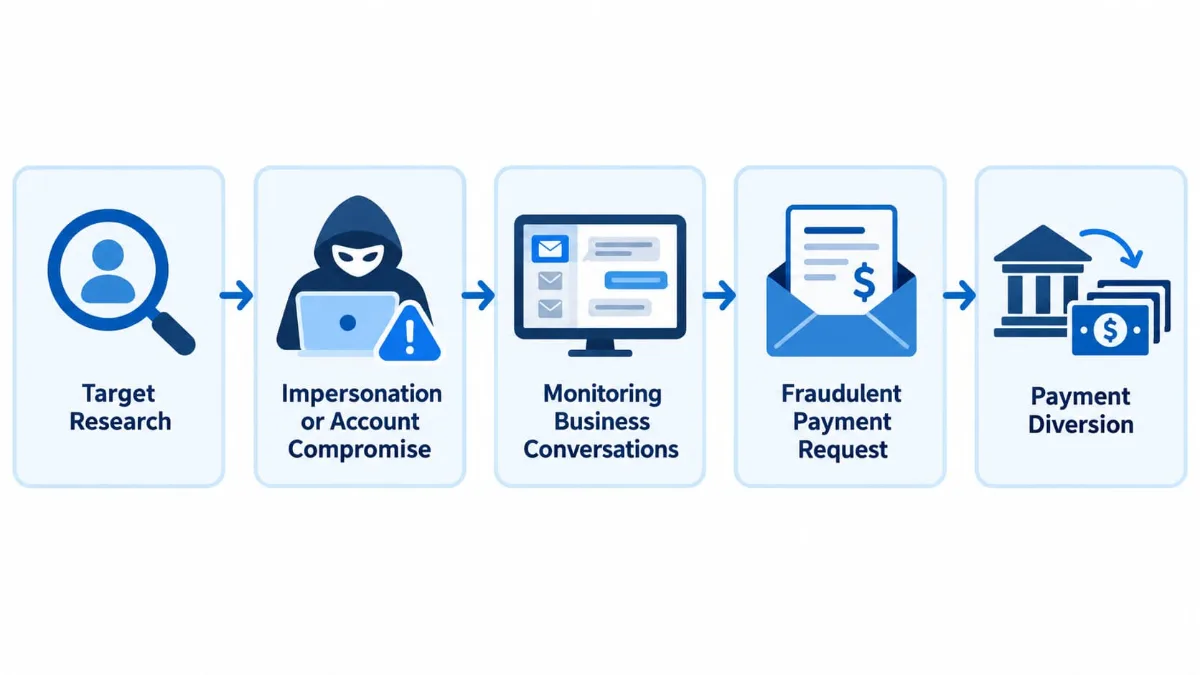
The exact sequence varies from case to case, but most BEC attacks follow a recognizable pattern. First, the attacker researches the target: company websites, LinkedIn profiles, press releases, and vendor relationships reveal who the executives are, who handles payments, and which suppliers the business works with. Second, they establish a credible identity, either by spoofing or registering a lookalike email address, or by compromising a real account.
Third, in many cases, they wait and observe. An attacker inside a mailbox can read ongoing conversations, learn when an invoice is due, and see how payment instructions are normally phrased. Fourth, at the right moment, they issue the fraudulent request, often timed to coincide with a real transaction, a busy period, or an executive’s travel. Finally, the payment is diverted to an account the attacker controls and moved on quickly.
Email Spoofing and Lookalike Domains
Spoofing means making a message appear to come from an address other than the one that actually sent it. In BEC, this takes two main forms. The sender’s display name is set to a real executive’s or vendor’s name while the underlying address is unrelated, or the attacker registers a domain that closely resembles the real one, with a swapped letter, an added word, or a different top-level domain.
A spoofed or lookalike sender does not mean the genuine mailbox has been compromised; the real account may be perfectly secure. The recognition cues are the same as for ordinary phishing; what sets BEC apart is the content: a payment or data request that fits the recipient’s job.
Compromised Email Accounts and Conversation Hijacking
The more dangerous variant involves a real account that an attacker has taken over, typically through stolen credentials, a reused password, or a phishing page. Once inside, the attacker does not need to imitate anyone. They can read the existing threads, identify an upcoming payment, and reply within a legitimate conversation.
Conversation hijacking works because every signal the recipient normally relies on checks out: the address is real, the thread history is real, the tone matches, and the request refers to a genuine invoice. The only thing that has changed is the bank account number. Attackers often add mailbox rules that forward or hide replies so the real owner does not notice the exchange. This is the scenario in which email filtering offers the least protection and process controls matter most.
Common Types of BEC Scams
The impersonated identity and the specific request vary, but every BEC scenario exploits the same thing: trust in an established relationship. The following are the forms businesses encounter most often, including the examples the FBI uses to illustrate the crime: a vendor invoice with updated details, an executive asking for gift cards, and wire instructions that appear to come from a title company.
Invoice Fraud and Vendor Impersonation
In vendor impersonation, the attacker poses as a supplier, or uses a supplier’s compromised mailbox, and sends an invoice that looks like the ones the business normally receives. The most common version is not a fake invoice at all, but a notice that the vendor has “changed banks” and that future payments should go to a new account. Because the invoice itself is legitimate and expected, accounts payable processes it as usual. A variant runs the other way: the attacker impersonates the customer and asks the supplier to ship goods or extend credit. The same mechanism hits real estate closings, where a buyer receives wire instructions that appear to come from the title company or attorney. In every direction, the control that stops the fraud is the same: a change in payment or delivery details is confirmed with the counterpart through a channel that existed before the request arrived.
CEO Fraud and Executive Impersonation
CEO fraud uses the authority of a senior person to pressure an employee into acting fast. The message appears to come from the CEO, CFO, or managing partner and asks for an urgent wire transfer, the classic form of wire transfer fraud, often to close a confidential deal or pay a vendor before a deadline. Secrecy is part of the script: the employee is told not to discuss it with colleagues, and the executive is conveniently “in a meeting” or traveling and cannot take a call. Authority, urgency, and isolation together are designed to make the employee skip normal approval steps. The defense starts at the top: no payment is ever authorized by email alone, and verifying a request from the CEO is expected, not disrespectful.
Payroll Diversion and Direct Deposit Fraud
In payroll diversion, the attacker impersonates an employee and emails HR or payroll asking to update their direct deposit information, usually from a personal-looking address with a plausible explanation. If the change is made without verification, the next paycheck goes to the attacker, and the fraud surfaces only when the real employee reports a missing salary. HR and payroll teams are targeted precisely because these requests are routine. The safeguard is a fixed procedure for banking changes: confirmation through the HR system or a phone call to a number already on file, never a reply to the email that made the request.
Gift Card Scams and Fraudulent Data Requests
Not every BEC attempt involves a wire transfer. A frequent, lower-value version is the gift card request: a message from “the boss” asks an assistant to buy gift cards for clients or staff and send back the card numbers and PINs. The amounts stay below approval thresholds, and the cards are drained within minutes. BEC also targets data: attackers posing as executives or auditors request employee W-2 forms, customer lists, or financial statements, which then feed tax refund fraud, identity theft, or more convincing follow-up attacks. Any unusual request for bulk personal or financial data deserves the same verification as a payment.
Why Business Email Compromise Can Bypass Traditional Email Security
Most email security technology is built to detect malicious content: known malware signatures, suspicious attachments, links to phishing sites, and messages sent from blacklisted infrastructure. A typical BEC message contains none of these. It is a short, well-written email about an invoice, a bank change, or an urgent payment, in the same vocabulary the business uses every day. From a filter’s point of view, it looks like normal correspondence.
There is a deeper reason as well. Email filters evaluate whether a message is dangerous; they cannot evaluate whether a payment instruction is true. Only a person, following a verification procedure, can establish that a vendor really did change banks or that the CEO really did approve a transfer.
When the message comes from a genuinely compromised account, the problem compounds: sender authentication may pass because the message is sent through the vendor’s legitimate email infrastructure, reputation checks pass because the domain has a clean history, and the thread is real. Research backs this up. A 2025 systematic review in Computers & Security notes that research on understanding and protecting against BEC remains limited and that detection still faces a set of open challenges. In practice, the hardest cases are exactly the ones above: attacks that rely on social engineering rather than technical indicators.
None of this makes email security unnecessary. Filtering, authentication, and account monitoring reduce the attempts that reach employees and make account takeover harder. They are necessary, but they are not enough on their own.
Warning Signs of a BEC Attempt
Because many BEC messages are professionally written and come from plausible or real addresses, the useful warning signs are about the transaction, not the formatting. Our phishing guide covers the technical cues such as sender address mismatches and suspicious links; the signals below are about what is being asked and how.
- A change to established payment details. A vendor, employee, or partner asks you to send money to a new bank account, a different country, or a different payment method than before. This is the signal behind many of the costliest BEC cases, and it should always trigger independent verification, however legitimate the request looks.
- Urgency combined with a request for secrecy. The payment must go out today, the matter is confidential, and the sender cannot be reached by phone. Legitimate urgent payments rarely require that the usual people be kept out of the loop.
- A request to bypass normal approvals. The sender asks you to skip the second signature, process the payment outside the usual system, or treat this one as an exception.
- An unfamiliar beneficiary or intermediary. The receiving account name does not match the vendor, or payment is to go through a new third party or escrow arrangement.
- A shift in an existing conversation. A thread that has been routine for months suddenly changes tone, introduces a new contact, moves to a personal email address, or asks that all further communication happen by email only.
- A request that fits the role but not the moment. The CEO asking for gift cards, HR receiving a direct deposit change the week before payday, a vendor’s “new” invoice arriving a day after the real one was paid.
None of these signs proves fraud; each of them should move the request out of the inbox and into a verification step.
How to Prevent Business Email Compromise Attacks
Effective BEC prevention is layered. Email security and account protection reduce the chance that a fraudulent message reaches an employee or that an attacker gets inside a mailbox. Employee awareness increases the chance that a suspicious request is recognized. Financial procedures ensure that even a convincing request cannot move money by itself. No single measure eliminates the risk; the combination makes a successful attack far less likely.
Businesses that want help designing and implementing the technical layers can work with a provider of cybersecurity services for businesses, while keeping the payment-approval layer firmly under the control of their own finance team.
Use MFA and Secure Business Email Accounts
Multi-factor authentication is the most important single control against account takeover, the entry point for the most convincing BEC attacks. With MFA enabled, a stolen password is no longer enough on its own to log in. It should be mandatory on all business email accounts and non-negotiable for executives, finance staff, administrators, and anyone who can approve payments. Where practical, phishing-resistant methods such as hardware security keys or platform authenticators offer stronger protection than SMS codes. Pair it with unique passwords kept in a password manager, restrictions on where and from which devices accounts can sign in, and alerts for unusual login locations. For a plain-language explanation of how MFA works and what to expect when rolling it out, see our guide to the benefits of multi-factor authentication.
One caveat is worth stating plainly: MFA protects your accounts, not your judgment. It does nothing against a spoofed message from an outside domain or a request sent from a vendor’s compromised account, which is why it sits alongside, not instead of, payment verification.
Strengthen Email Filtering and Account Monitoring
Modern email filtering can catch a meaningful share of BEC attempts: messages from newly registered lookalike domains, display-name impersonation of executives, and language patterns associated with payment fraud. Email authentication standards reduce spoofing of your own domain: SPF specifies which servers may send mail for it, DKIM signs outgoing messages, and DMARC tells receiving servers what to do when a message fails those checks. These controls limit how easily an attacker can impersonate your company; they cannot stop a message from a vendor whose real account has been compromised. That gap is covered by monitoring: alerts on new mailbox forwarding rules, sign-ins from unexpected locations, and changes to recovery settings, with extra scrutiny on administrator and finance accounts. Reviewing those alerts promptly is often how a compromise is discovered before a fraudulent payment is requested.
Verify Bank Account Changes Through a Separate Channel
This is the control that stops most invoice and payment diversion fraud, and it costs nothing to implement. Any change to a vendor’s, employee’s, or partner’s banking details, and any new or unusual payment instruction, is confirmed through a channel that existed before the request: a phone call to the number already in your vendor file, a conversation with your regular contact, or a check in a shared portal.
The phone number in the email that requests the change does not count. Neither does a reply to that email, because if the account is compromised, the attacker is the one who answers. The rule applies even when the request comes from a long-standing vendor or a known employee, and especially when it arrives with an explanation of why the usual contact is unavailable. The FBI’s guidance is the same: verify payment requests in person or by phone, and confirm any change to account numbers or payment procedures with the requester directly.
Require Dual Approval for High-Value Payments
Separation of duties means that the person who enters a payment is not the person who releases it. Dual approval adds a second, independent authorization for transfers above a threshold the business defines, with approvers and limits documented rather than left to habit, and both steps performed in the payment system rather than by replying “approved” to an email. The procedure must also resist exceptions. A BEC attack almost always arrives with a reason to skip the second approval: the deadline, the confidentiality, the executive’s unavailability. If the policy allows exceptions on request, it offers little protection; if it requires verbal confirmation from the second approver for any exception, the attack usually stalls there.
Train Employees and Establish a BEC Reporting Procedure
Training works best when it is specific to the people who handle money and data. Finance, accounts payable, payroll, HR, executive assistants, and vendor-facing staff should see realistic examples of invoice fraud, bank-change requests, executive impersonation, and gift card scams, and practice the verification steps rather than just hear about them. Equally important is a clear reporting path: employees should know who to tell when a payment request feels wrong, that reporting is expected even when they are not sure, and that questioning a request from a senior person will never be held against them. Review the procedures periodically, when staff change roles, and after any incident or near miss.
What to Do If Your Business Falls Victim to a BEC Attack
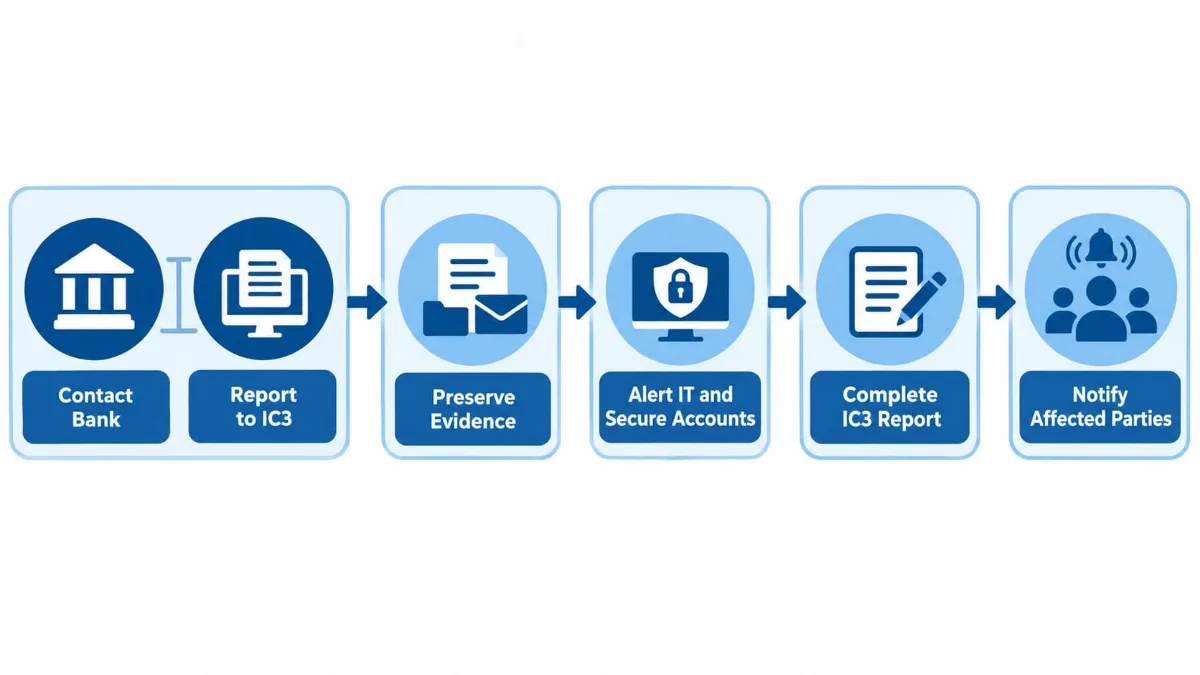
If a fraudulent payment has already been sent, speed matters more than anything else. Treat the situation as an emergency. The first two steps happen at the same time, within hours; the rest follow immediately, but none of them should delay the fraud report.
- Contact your bank immediately, and report to the FBI in parallel. Call your financial institution, explain that the transfer was fraudulent, and ask it to attempt a recall and to contact the receiving bank. At the same time, file a complaint with the FBI’s Internet Crime Complaint Center at ic3.gov (details in step 4); the sooner both happen, the higher the chance that funds can be frozen before they are moved again.
- Preserve the evidence before changing anything. Keep the original emails, including full message headers, any invoices or attachments, the transaction details, and bank records. Do not delete mailbox rules or reset accounts until the evidence has been captured, because forwarding rules and sign-in logs show how the attack happened.
- Alert your IT or security team and secure the accounts. Once evidence is preserved, reset passwords on the affected and related accounts, enforce MFA, remove unauthorized forwarding rules and app permissions, and review sign-in history for other compromised mailboxes.
- Complete the IC3 report with full details. Include the transaction details, the receiving account information, and the dates. The IC3 works with financial institutions through its Recovery Asset Team to freeze funds where possible; in 2025 it reported a 58% success rate in freezing funds across all the domestic fraud cases it handled, not only BEC, so a prompt report can make a real difference, though recovery is never guaranteed.
- Notify the other parties. Tell the impersonated vendor, employee, or executive, so they can check their own accounts, and inform your cyber insurer if you have a policy, since many policies require prompt notice.
Do not attempt to negotiate with or trace the attacker yourself, and do not rely on the attacker’s “refund” offers, which can be a second stage of the same fraud.
BEC Prevention Checklist
Use this list to check where your business stands. Each item is covered in more detail above.
- MFA enforced on every business email account, with no exceptions for executives
- SPF, DKIM, and DMARC configured for your domain, with DMARC reports reviewed
- Email filtering in place, including impersonation and lookalike-domain detection
- Alerts for new forwarding rules, unusual sign-ins, and recovery-setting changes
- Extra protection and monitoring on administrator and finance accounts
- Written procedure: every banking change is verified through a pre-existing channel
- Dual approval, inside the payment system, for transfers above a defined threshold
- No exceptions to approvals without verbal confirmation from a second approver
- Targeted training for finance, HR, payroll, and executive support staff
- A known, no-blame reporting path for suspicious payment requests
- A documented incident response plan: bank, evidence, IT, IC3, notifications
- Payment and approval policies reviewed at least once a year and after any incident
How IT Support Helps Businesses Reduce BEC Risks
Many of the technical controls above are easy to describe and easy to leave half-finished: MFA enabled for most users but not all, DMARC set to monitor-only and never enforced, forwarding-rule alerts that exist but nobody reads. This is where a professional IT support provider earns its place: finding those gaps and finishing the job properly.
Computer Services New Jersey helps businesses configure multi-factor authentication and password management, set up email filtering and help with email authentication for their domains, review who has access to what so that fewer accounts can approve or change payments, and monitor accounts and systems around the clock so that unusual sign-ins and mailbox changes do not go unnoticed. When something does go wrong, a team that already knows your environment shortens the time between discovery and containment. We also help employees understand what a fraudulent payment request looks like and what to do about it.
What IT support does not replace is the business’s own payment discipline. Verifying a bank change by phone and requiring two approvals for large transfers are decisions for the owners and the finance team, and they remain the most reliable defense against the attacks technology cannot see.
If you would like help reviewing your business email security and account protections, you can request professional IT support and we will take a look at where your business stands.
Frequently Asked Questions About Business Email Compromise
What is business email compromise?
Business email compromise (BEC) is a fraud scheme in which criminals impersonate trusted business contacts or exploit compromised email accounts to trick employees into transferring money or sharing sensitive information.
What is the difference between BEC and phishing?
Phishing commonly uses deceptive messages to obtain credentials, information, or access. BEC is typically a targeted fraud involving trusted business identities, financial requests, or sensitive data. Phishing may be used to gain access to an account before a BEC attack.
Can business email compromise happen without a malicious link?
Yes. A BEC message may contain only a payment request, invoice, or revised bank details. Attackers can manipulate legitimate business conversations without including malware or suspicious links.
How can businesses prevent business email compromise?
Businesses can reduce BEC risks through MFA, secure email configuration, suspicious login monitoring, employee training, independent verification of payment changes, and dual approval for significant transactions.
What should I do if my company sent money to a BEC scammer?
Contact your financial institution immediately and request assistance with recalling the transfer, and report the incident to the FBI’s Internet Crime Complaint Center at ic3.gov at the same time. Then preserve the emails and transaction records, alert your IT or security team, and secure the affected accounts.
Can email filtering alone stop BEC attacks?
No. Email filtering can identify many suspicious messages, but some BEC attacks involve genuine compromised accounts or messages without malicious links. Businesses also need account security, independent payment verification, and financial approval procedures.
Need IT help? A real person answers in 30 minutes.
Author
-
At Computer Services New Jersey, led by George Ancuta, we believe that small and midsize businesses deserve the same level of security, reliability, and strategic foresight as global financial institutions. Our firm provides more than just support; we offer a quarter-century of technical perspective forged in the world’s most demanding financial and corporate environments.